
01 · Project overview
Catching transaction-file errors before reconciliation begins.
Reconciliation depends on accurate data from bank transfers, card payments, agency banking, and internal ledgers. At Credrails, CSV file errors repeatedly interrupted that process and forced operations teams to repair data manually.
I designed the File Validator to run checks during upload, explain what was wrong, and let users resolve errors inside the product before the file entered the reconciliation pipeline.
02 · Problem context
Small data errors created expensive operational delays.
Reconciliation officers worked with files containing thousands or millions of rows. A truncated reference, duplicate transaction, missing record, or incorrect opening balance could cause the entire process to fail.
Manual repair
Teams moved back to Excel to locate and correct errors one file at a time.
Failed reconciliation
Bad input files created repeated processing failures and delayed settlements.
Low confidence
Users could not be certain they had found every issue in a large dataset.
Operational strain
Repeated firefighting reduced time available for higher-value analysis.
03 · Goal
Turn validation from a manual prerequisite into part of the product.
The feature needed to detect errors automatically, communicate them in plain language, support in-product fixes, and scale to enterprise-sized transaction files.
Prevent incorrect files from disrupting reconciliation while giving users enough context and control to resolve each issue confidently.
04 · Research and discovery
Learning where data quality became a human problem.
I interviewed reconciliation and settlement teams from organisations using the platform. They described the repeated burden of cleaning files, locating missing records, and re-running failed processes under settlement deadlines.
Users wanted the system to do the heavy lifting, but they did not want a black box. They needed to see what had been flagged, understand the impact, and decide whether to fix or continue.
A review of reconciliation and treasury platforms revealed an opportunity. Many products automated validation, but few made in-platform correction understandable and actionable.
Explain the error
A category alone was not enough. Users needed examples and affected rows.
Keep control
Teams needed the choice to fix, skip, or investigate based on operational context.
Design for scale
The experience had to remain usable when a file contained millions of rows.
05 · Design process
Designing a diagnostic journey before designing the error states.
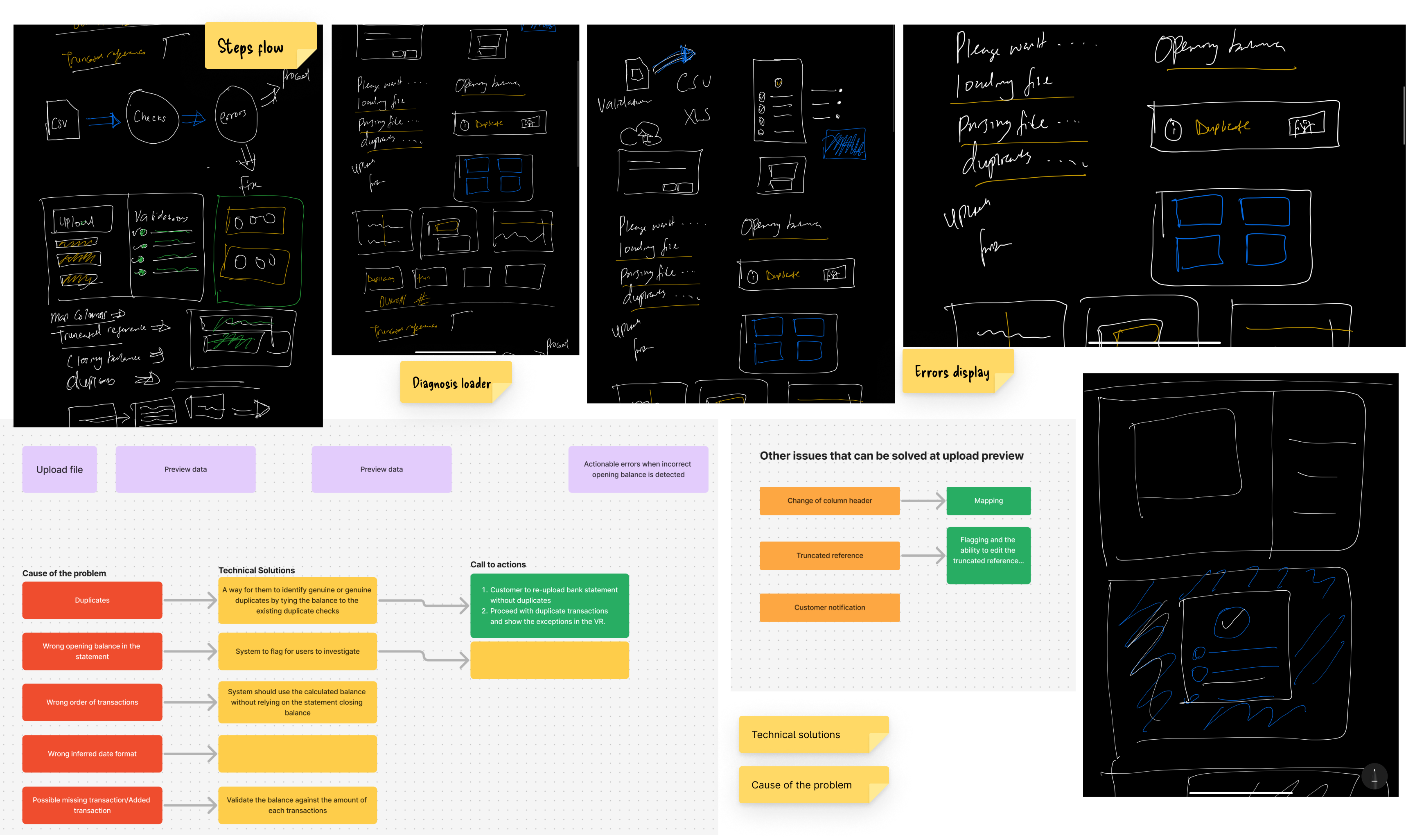
The team mapped a pre-ingestion flow: upload a file, run diagnostic checks, group issues by type, inspect affected records, and choose how to resolve them. Early wireframes kept the sequence intentionally simple and made the system status visible throughout.
Prototypes introduced categorised summaries, inline explanations, and a guided fix process. Close collaboration with engineering helped us shape batch processing and performance constraints into the interaction model.
06 · Testing
Testing comprehension, control, and performance.
Prototype sessions focused on whether users understood error messages and could move through upload, diagnosis, and correction without assistance. Participants liked the grouped summaries but wanted clearer examples and control over when to fix an issue.
We added inline examples, improved movement between steps, and provided a skip option. Testing the built solution then focused on diagnostic accuracy, very large files, and whether the final workflow matched the prototype.
Performance initially declined on extremely large datasets, so batch processing was refined while the error display and resolution controls were tuned around real usage.
07 · Solution
An actionable validation layer inside the reconciliation workflow.
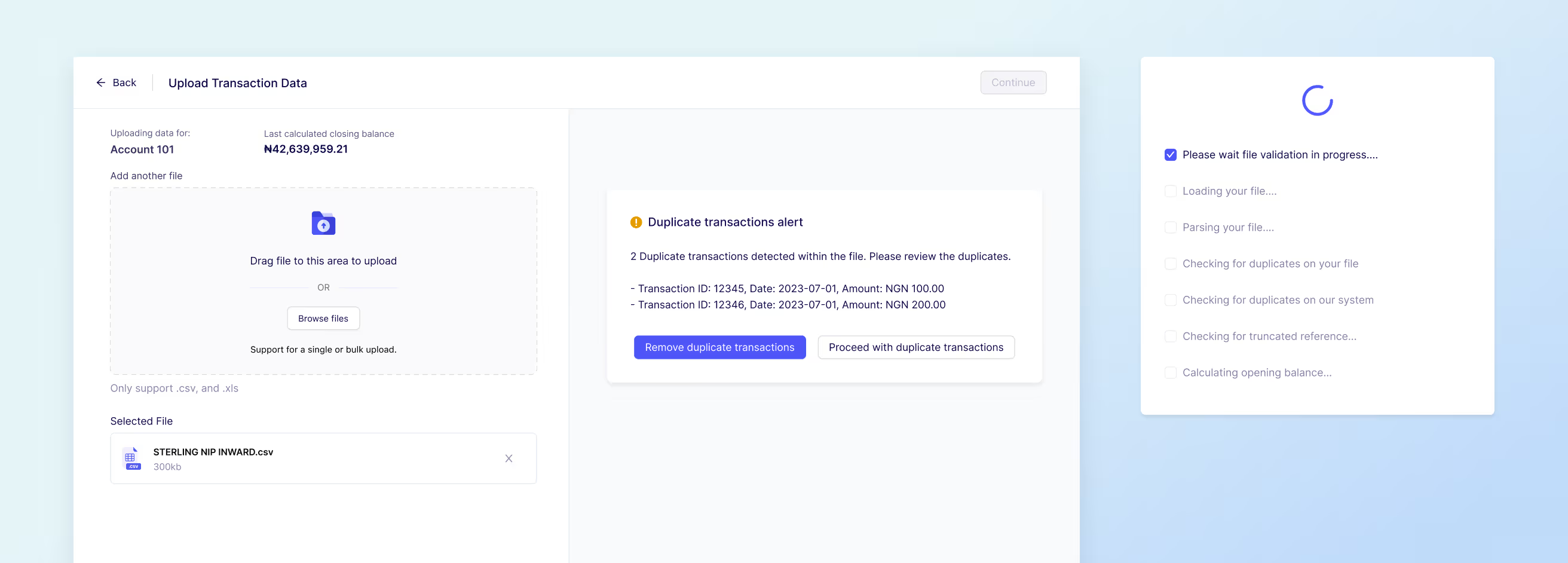
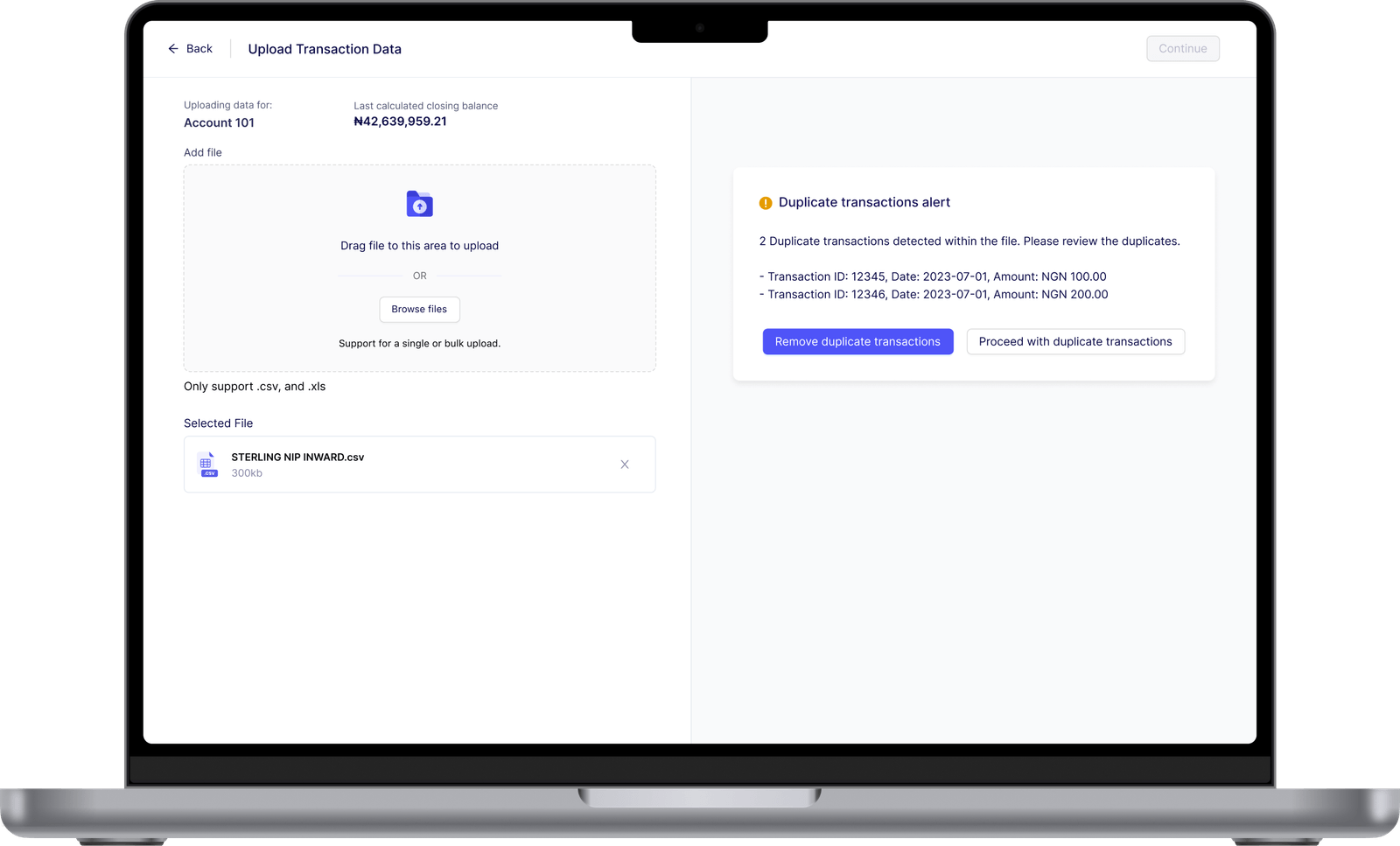
Every file is checked before ingestion so bad data cannot silently contaminate reconciliation. Errors are grouped by type and connected to affected records, with explanations and clear actions to fix or skip.
The workflow keeps users inside the product, removes repeated Excel clean-up, and supports large datasets through batch processing. The result is both automation and agency: the system finds the issue, while the user remains in control of the resolution.
08 · Results and impact
Fewer failures and less time spent repairing files.
The File Validator reduced reconciliation failures, accelerated file processing, and improved the efficiency of reconciliation teams. Catching issues before ingestion also increased confidence in both the data and the platform.
The project showed that automation is most useful when it makes a problem easier to understand. Clear explanations and reversible user choices turned a technical validation engine into a dependable operational tool.
Reflection
Good automation explains before it acts.
The File Validator reinforced that operational teams trust automation when they can understand its judgement. Detecting an error was only the first step. The product also needed to show the affected data, explain the consequence, and preserve the user's ability to decide what happened next.
That principle has stayed relevant as I design more AI-assisted systems: speed is valuable, but confidence comes from context, control, and reversible decisions.
Automation becomes dependable when people can inspect its reasoning and remain in control of the outcome.